INDIA
INDIA
 USA
USA CANADA
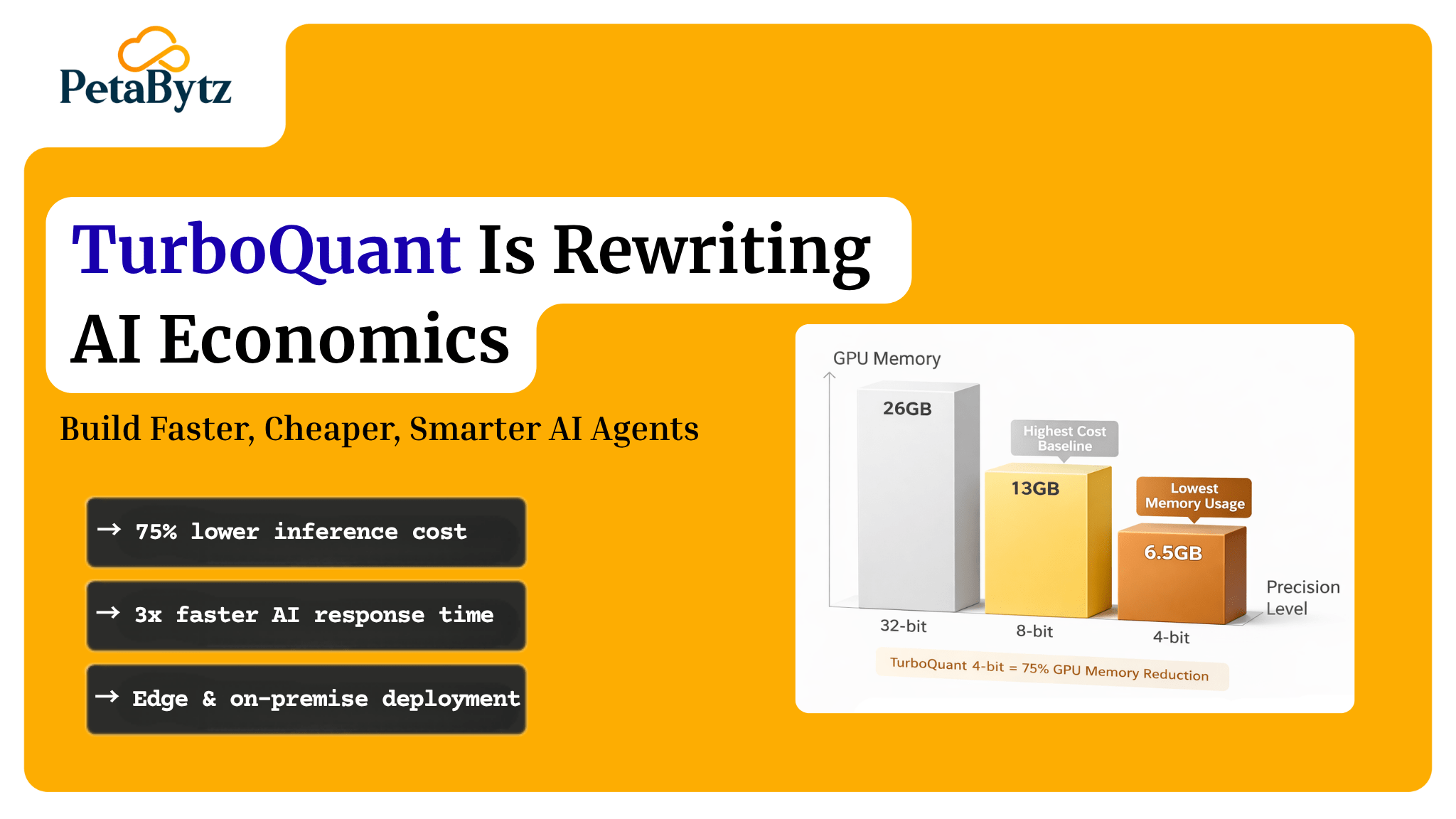
TurboQuant Is Rewriting AI Economics: Build Faster, Cheaper, Smarter AI Agents
10/04/2026
You built an AI agent. It works. But the inference bill keeps climbing, and your response times are too slow for real users. Sound familiar? Most AI teams hit this wall. The model is capable but expensive to run. Scaling it means throwing more compute at the problem, and that path destroys margin fast.
TurboQuant changes the equation. It compresses AI models so they run faster and cheaper, without sacrificing the intelligence that makes them useful.
In this guide, you will learn:
- What TurboQuant is and how it works
- Why AI model compression matters right now
- When to use TurboQuant in your AI workflow
- The key components that make it effective
- Best practices to get the most out of it
Contact us now
TurboQuant AI: Cut Costs, Boost Speed, Scale Smarter
What is TurboQuant and how does it work?
TurboQuant is an AI model quantization and compression framework. It reduces the size and memory footprint of large language models and AI agents while preserving as much of the original accuracy as possible.
Standard generative AI models store weights in 32-bit or 16-bit floating point format. TurboQuant converts these weights into lower-precision formats, such as 4-bit or 8-bit integers. The result is a model that uses far less memory and runs significantly faster at inference time.
What separates TurboQuant from basic quantization is its layerwise calibration and outlier handling. It identifies the most sensitive parameters and treats them with higher precision. This keeps accuracy high even when the overall model is dramatically compressed.
The outcome: you deploy capable AI agents on smaller hardware, serve more requests per second, and spend less per inference. That is a structural shift in how AI economics work.
Importantly, TurboQuant supports post-training quantization, meaning you compress an existing model checkpoint without retraining it. No labeled data. No fine-tuning pipeline. Just calibration and deployment.
Why TurboQuant matters in 2025
The generative AI boom did not come with a cost discount. Infrastructure costs scale non-linearly with usage, and end users now expect AI agents to respond in milliseconds. TurboQuant addresses both problems at once.
- Inference costs drop by 50 to 75 percent through AI memory compression, cutting per-query GPU spend directly
- Latency improves because smaller models run through hardware faster, making AI agents more responsive
- Edge deployment becomes viable since compressed models fit on devices where full-size models never could
- Multi-agent systems scale better because each compressed agent uses less VRAM, enabling true parallelism
- Fine-tuning becomes accessible since lower memory requirements mean you can train on consumer-grade GPUs
The teams winning in AI right now are not running the biggest models. They are running the most efficient ones.
When should you use TurboQuant?
Not every AI project needs compression. But more do than most teams realize.
When inference costs are eating your budget
If your AI API or GPU spend is growing faster than your AI-driven revenue, compression is the most direct lever you have. TurboQuant reduces cost per query by 50 to 80 percent in most deployments.
When your agents are too slow for real-time use
If your AI agent takes 4 to 6 seconds to respond, users disengage before the answer arrives. TurboQuant speeds up the forward pass and cuts latency significantly. Faster agents are not just better UX. They are a product requirement.
When you need on-premise or edge deployment
Running full-precision models on restricted hardware is impractical. AI memory compression through TurboQuant makes it possible to run capable models where 70B parameter models would simply never fit, opening deployment surfaces that were previously inaccessible.
When you want to fine-tune without massive compute costs
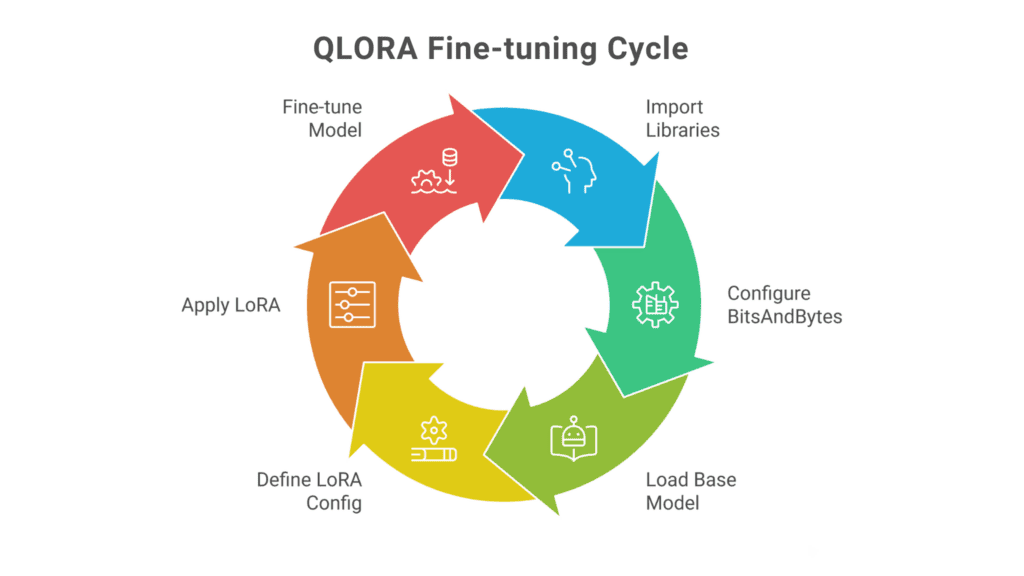
Fine-tuning large language models is expensive. Combined with techniques like QLoRA, TurboQuant lets practitioners fine-tune compressed models with dramatically reduced GPU memory requirements. Domain adaptation becomes accessible to teams without dedicated ML infrastructure.
Key elements of effective TurboQuant compression
Layerwise quantization calibration
TurboQuant analyzes each model layer individually and applies optimal quantization thresholds per layer. Critical layers retain higher precision while less sensitive layers compress aggressively. The result is a model that is small but still sharp.
Outlier weight handling
Large language models contain weight outliers that are disproportionately important for performance. Standard quantization clips these values and destroys critical information. TurboQuant detects and protects them with special precision channels, preserving model quality where it matters most.
Zero-shot quantization without retraining
TurboQuant can compress a pretrained model without any retraining. You run the calibration pipeline on an existing checkpoint and get a compressed model ready for deployment. This shortens the path from model selection to production dramatically.
Hardware-aware kernel optimization
TurboQuant includes optimized CUDA kernels built for quantized inference on modern GPU architectures. These kernels use hardware-level integer arithmetic, which is significantly faster than floating point on most chips. This is why TurboQuant delivers real latency gains, not just theoretical compression ratios.
Best practices to improve your TurboQuant implementation
- Calibrate on your actual production prompts, not generic text
Even 128 representative examples improve how well TurboQuant preserves task-specific performance. Generic calibration data produces generic results.
- Start with 4-bit and measure before defaulting to 8-bit
Most teams default to 8-bit because it feels safer. In practice, 4-bit GPTQ quantization preserves quality better than expected. Only move to 8-bit if benchmarks show unacceptable quality loss.
- Benchmark on your actual deployment hardware
TurboQuant performance varies by GPU generation. Ampere and Ada Lovelace GPUs benefit most from 4-bit kernels. Do not rely on results from hardware you are not deploying on.
- Use group size 128 as your default starting point
Group size 128 is the empirically tested sweet spot between accuracy preservation and compression efficiency for most generative AI models.
- Monitor quality continuously in production, not just at launch
Compressed models can behave differently on edge-case inputs not in your calibration data. Lightweight automated evaluation pipelines catch quality drift before it becomes a user-facing problem.
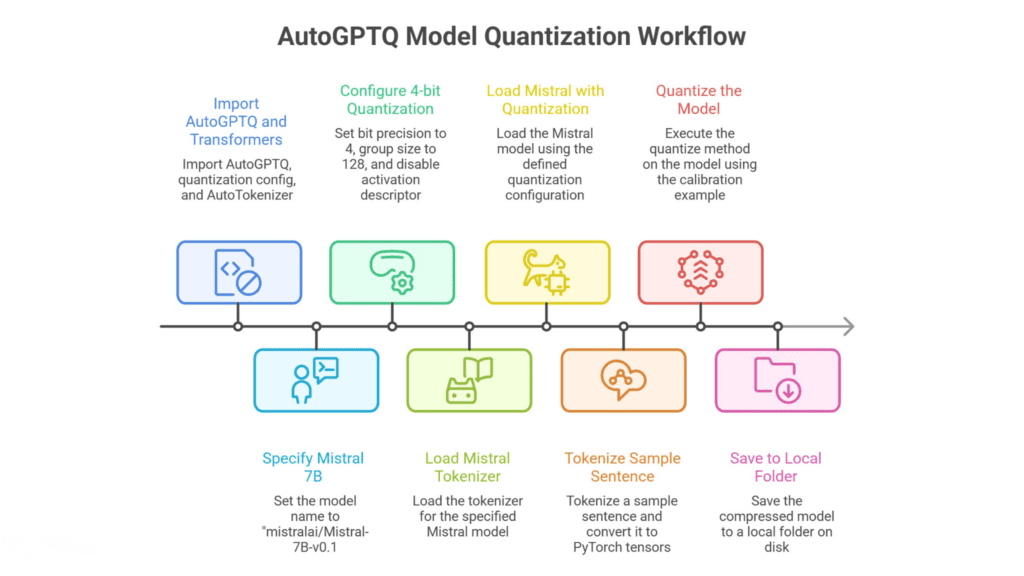
Basic post-training quantization for a local LLM
Use case: Compress a pretrained open-source model for faster local or server inference.
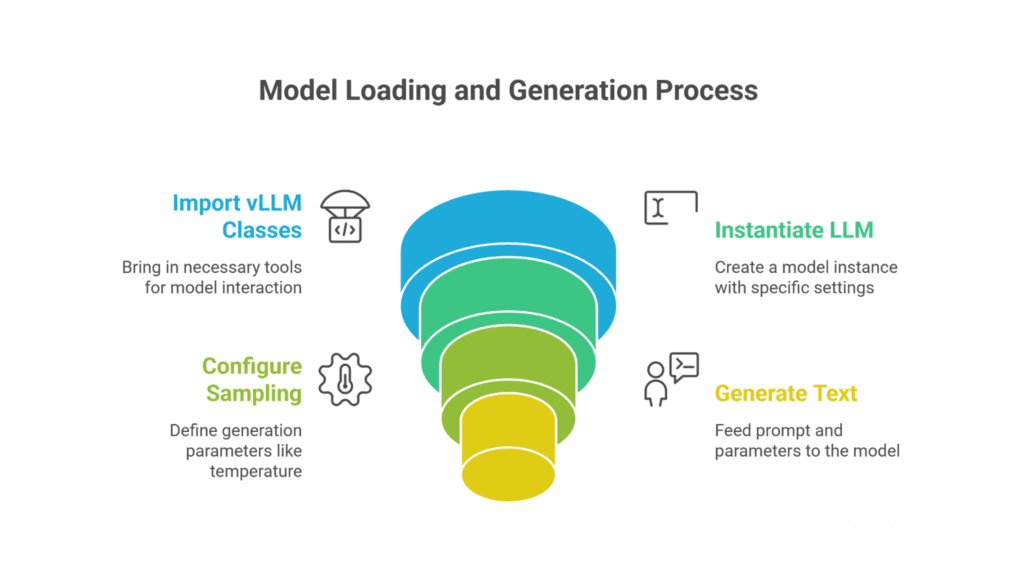
Load and serve a TurboQuant-compressed model with v LLM
Use case: High-throughput API serving of a compressed model.
Fine-tuning a compressed model with QLoRA
Use case: Domain-specific fine-tuning on a resource-constrained GPU.
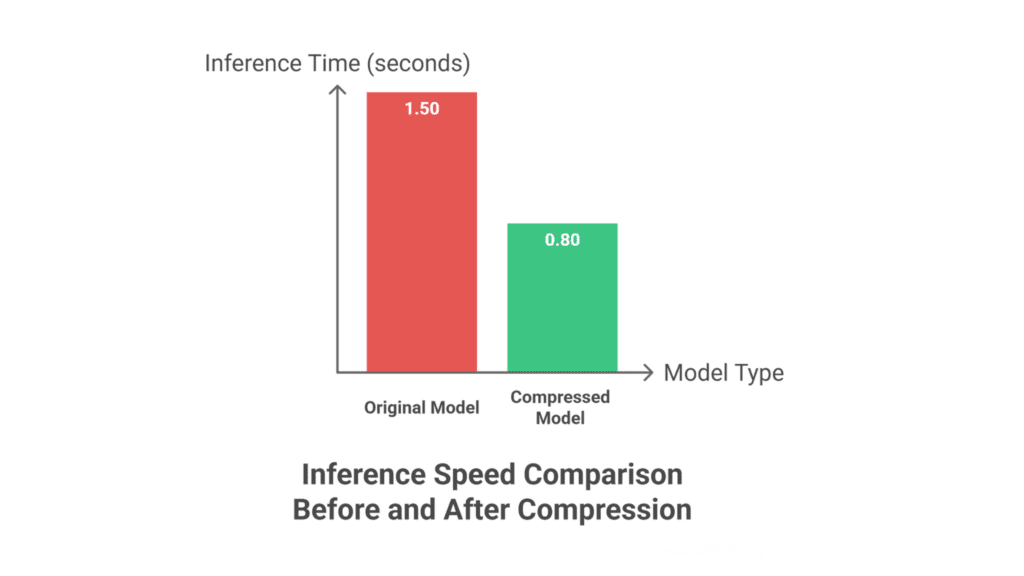
Benchmarking inference speed before and after compression
Use case: Measure actual latency improvements from TurboQuant compression.
Real examples of TurboQuant that work
Theory is useful. Applied results are better. Here are realistic examples of TurboQuant in production-grade scenarios.
Example 1: A SaaS company cuts LLM inference costs by 68 percent
A B2B SaaS platform building an AI writing assistant was spending roughly $40,000 per month on LLM API calls. The product team applied TurboQuant to compress their fine-tuned Mistral-7B model to 4-bit precision and moved to self-hosted inference using vLLM. Response latency dropped from an average of 3.8 seconds to 1.2 seconds. Monthly inference costs fell to under $13,000. The compressed model maintained a BLEU score within 2 percent of the original on their evaluation benchmark.
This works because post-training quantization with layerwise calibration preserves quality where it counts, and hardware-aware kernels deliver real latency gains rather than just theoretical size reduction.
Example 2: A fintech startup deploys AI agents on-premise for compliance reasons
A fintech company needed to run AI document analysis agents on-premise inside a private data center due to regulatory constraints. Their chosen model, a 13B parameter LLaMA variant, required 26GB of VRAM at full precision. Their available hardware maxed out at 16GB per GPU. After TurboQuant compression to 4-bit, the model loaded in 8GB of VRAM with a negligible accuracy tradeoff on their financial document classification task. They went from blocked to deployed in under a week.
This works because AI memory compression is not just a cost strategy. It is an enabler of deployment scenarios that are otherwise technically impossible.
How this connects to your broader agentic AI strategy
TurboQuant is a powerful optimization, but extracting its full value requires more than running a quantization script. You need the right architecture, calibration strategy, and deployment setup working together. Many teams spend months iterating through compression pipelines, debugging quality issues, and rebuilding inference stacks from scratch. That is time that should go toward building product, not plumbing.
This is where Petabytz helps. As a specialized agentic AI development and deployment service, Petabytz designs, builds, and ships production-ready AI agent systems, with model optimization built into every engagement from day one, not as an afterthought. If you are hitting walls on cost, latency, or deployment complexity, that is exactly the problem Petabytz is built to solve.
Conclusion
You do not need to overcomplicate this. TurboQuant is one of the most accessible, high-impact optimizations available to AI teams today. The tooling is mature. The results are measurable. The path from full-precision to compressed is shorter than most teams think.
Faster agents. Cheaper inference. Deployments that actually fit your hardware and your budget. These are no longer nice-to-haves. They are the table stakes of sustainable AI in production. The organizations that move on this now will have a compounding advantage. Every dollar saved on inference is a dollar that goes back into building better products. Every millisecond saved in latency improves the user experience.
Start with one model. Run the calibration. Measure the difference. The results will tell you exactly where to take it next.
Frequently Asked Questions (FAQ’s)
1. What is TurboQuant and how does it work?
TurboQuant is an AI model quantization framework that reduces model weight precision from 16-bit or 32-bit floating point down to 4-bit or 8-bit integers. It uses layerwise calibration, outlier protection, and hardware-optimized kernels to deliver compressed models that are significantly smaller and faster, with minimal accuracy loss compared to the original full-precision model.
2. How do I implement TurboQuant in my AI models?
Implementation involves three steps: prepare a calibration dataset representative of your use case, run the TurboQuant post-training quantization pipeline against your model checkpoint, then deploy the compressed model through an inference serving framework like vLLM or TGI. No retraining is required. Most 7B to 13B models can be compressed in a few hours.
3. What are the benefits of TurboQuant compression?
The primary benefits are reduced inference cost, lower latency, smaller memory footprint, and expanded deployment options. In production, TurboQuant typically reduces GPU memory usage by 50 to 75 percent, cuts per-query costs by a similar margin, and improves response latency by 2 to 3 times over the full-precision baseline.
4. Does TurboQuant significantly reduce model accuracy?
For most generative AI tasks, the accuracy drop from 4-bit TurboQuant compression is very small, typically 1 to 3 percent on standard benchmarks. The layerwise calibration and outlier protection are specifically designed to minimize degradation. For highly sensitive tasks, 8-bit quantization delivers an even smaller accuracy gap with modest cost tradeoffs.
Recent Posts