INDIA
INDIA
 USA
USA CANADA
AI-Powered Incident Management: Faster Resolution, Less Downtime
08/05/2026
Your monitoring tool just fired 300 alerts at 2 AM. Your on-call engineer is drowning. Three critical services are down. And nobody knows where to start.
This is what broken incident management looks like. And it costs companies far more than they realize – in revenue, in reputation, and in burned-out teams.
AI-powered incident management changes this equation. It moves IT teams from reactive firefighting to proactive, intelligent response – before users ever notice a problem.
In this guide, you’ll learn:
- Why traditional incident management keeps failing IT teams
- How AI detects, classifies, and routes incidents faster than humans can
- The role of predictive monitoring in preventing downtime before it starts
- How to reduce Mean Time to Resolution (MTTR) with automation
- Ready-to-use workflow templates for AI-driven incident response
- Best practices to improve your incident management process today
Contact us now
AI Powered Incident Management: Faster Resolution
Why traditional incident management keeps failing
Most IT teams still rely on manual processes for incident management. Someone spots an alert, opens a ticket, assigns it to a team, and waits. Meanwhile, systems degrade and users complain.
The core problem is volume and speed. Modern IT environments generate thousands of events per minute. Human teams simply cannot triage and prioritize at that scale.
Here’s what that looks like in practice:
- Alert fatigue: Too many notifications, too little context
- Slow ticket routing: Wrong team gets the ticket, time is wasted
- Repeat incidents: No root cause analysis means the same issue recurs
- SLA breaches: Response times exceed commitments, customers churn
- Productivity loss: Engineers spend hours on incident management instead of innovation
Traditional incident management tools weren’t built for today’s hybrid, cloud-native, microservices-based environments. You need something smarter.
What AI-powered incident management actually does
AI doesn’t just speed things up. It changes how incident management works at a fundamental level.
Intelligent alert correlation
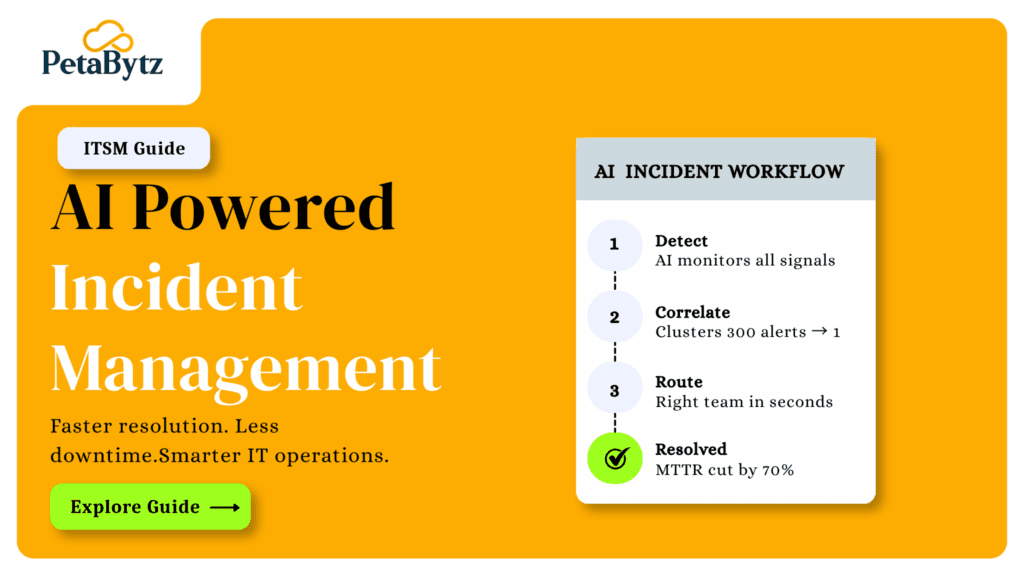
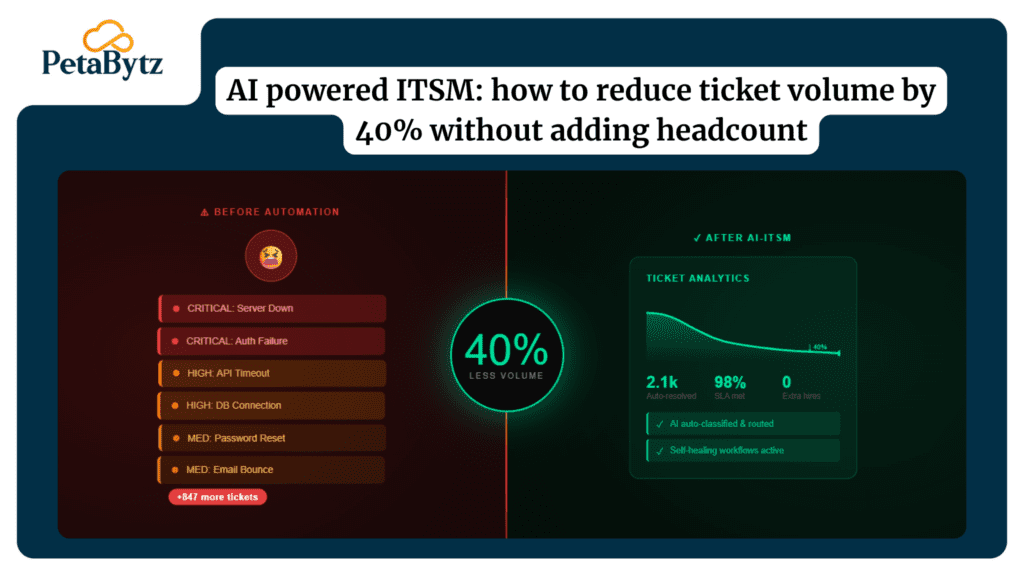
AI clusters related alerts into a single incident. Instead of 300 individual alerts, your team sees one meaningful event with full context. That alone can cut resolution time by 40% or more.
Automated ticket routing and classification
Good incident management software uses machine learning to read the incident, classify its type, estimate its severity, and route it to the right team — automatically.
Root cause analysis at machine speed
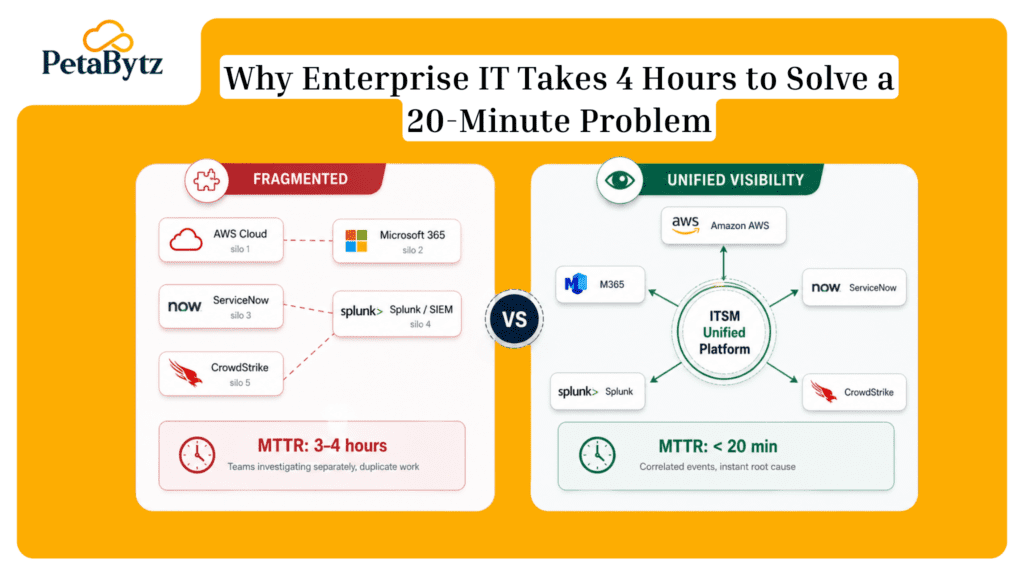
AI analyzes patterns across your entire infrastructure to identify root causes. It surfaces the most likely fix before your engineer even opens their laptop. This is what shrinks MTTR from hours to minutes.
Predictive monitoring and proactive incident prevention
The best AI systems don’t just react to incidents — they predict them. By analyzing historical patterns, resource trends, and anomaly signals, AI flags problems before they become outages.
This shift from reactive to proactive service management is the single biggest operational gain AI brings to IT teams.
How AI reduces Mean Time to Resolution (MTTR)
MTTR is the single most important metric in incident management. Every minute of downtime costs money. AI attacks MTTR from multiple angles.
- Detection time: AI detects anomalies in real time, often before users report issues
- Triage time: Automated classification eliminates the guesswork phase
- Escalation time: Smart routing gets the right engineer on the right problem, fast
- Resolution time: AI-suggested fixes and runbooks cut hands-on resolution time
- Post-incident time: Automated reports replace manual write-ups, freeing engineer hours
Organizations that adopt AI-driven ITSM incident management consistently report 50–70% reductions in MTTR within the first six months. That’s not a small improvement — it’s a structural shift in how IT operates.
Key capabilities to look for in incident management software
Not all incident management software is built equal. Here’s what separates AI-native platforms from legacy tools with an “AI” label slapped on top.
- Real-time anomaly detection across infrastructure, apps, and services
- Natural language processing for ticket interpretation and auto-categorization
- Bi-directional integrations with your existing monitoring and ITSM tools
- Self-learning models that improve routing accuracy over time
- Built-in runbook automation triggered by specific incident types
- Post-incident analytics with trend detection and recurrence prevention
If your incident management software can’t do these things, you’re leaving performance and reliability on the table.
Incident management workflow templates (ready to use)
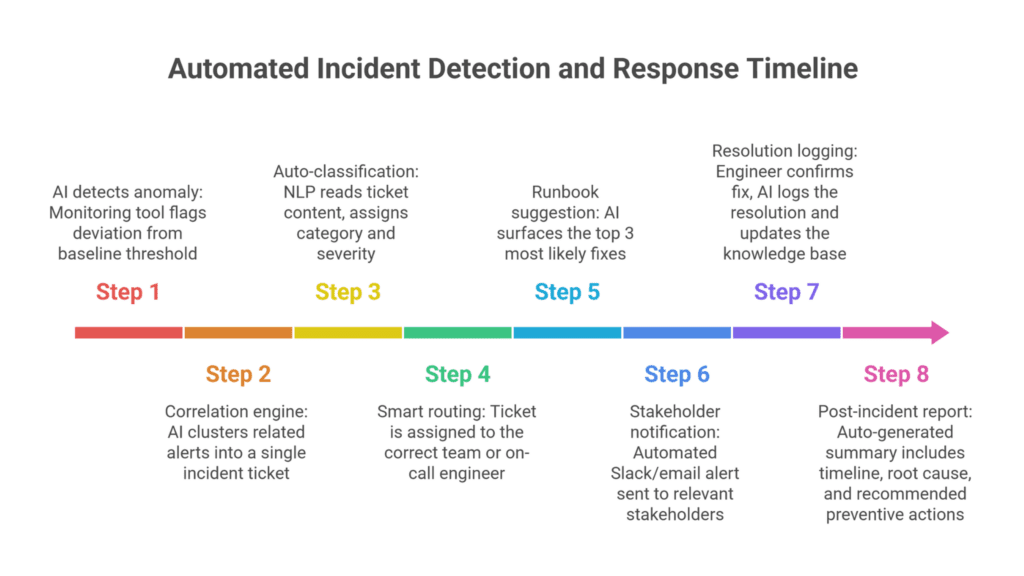
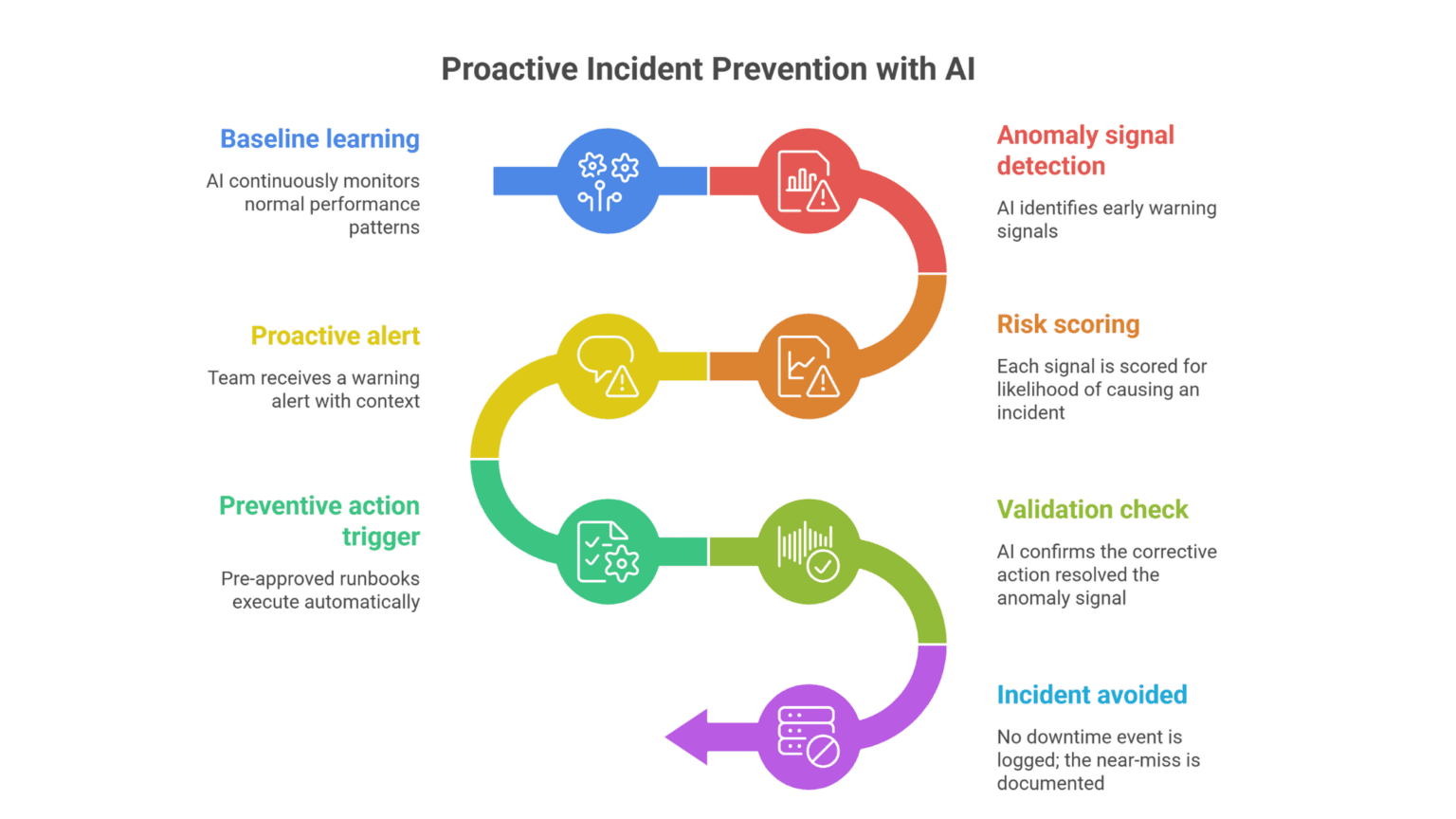
These two workflow templates are designed for teams moving to AI-assisted incident management. Use them as-is or adapt them to your environment.
1: AI-triggered incident response workflow
Use case: Automated detection and first-response for P1/P2 incidents
2: Predictive incident prevention workflow
Use case: Proactive monitoring to prevent incidents before they impact users
Suggested Reading:
ITSM incident management simplified: 7 proven ways to resolve issues fasterWhy businesses can’t afford slow incident management anymore
Downtime is expensive. Gartner estimates that IT downtime costs an average of $5,600 per minute. For enterprise companies, that figure climbs well above $300,000 per hour.
Beyond the direct costs, there are hidden costs that quietly drain your business:
- Customer trust — every outage erodes confidence in your platform
- Employee morale — repeated firefighting burns out your best engineers
- Compliance exposure — SLA breaches can trigger contractual penalties
- Technical debt — teams patching symptoms instead of fixing root causes
Effective incident management isn’t just an IT concern — it’s a business continuity strategy. And AI makes that strategy executable at scale.
Best practices to improve your incident management process
- Define your incident severity tiers clearly
P1 through P4 definitions should be documented and agreed upon across teams. AI routing only works well when severity criteria are consistent. Review and update these definitions quarterly.
- Build and maintain a living runbook library
AI is only as good as the knowledge you feed it. Document your most common incident types with step-by-step resolution guides. Every post-incident review should result in an updated or new runbook entry.
- Reduce alert noise before adding AI
AI can correlate alerts, but it can’t fix a fundamentally broken alerting strategy. Audit your alert thresholds. Remove low-signal, high-noise alerts first. Your incident management process will improve immediately.
- Conduct structured post-incident reviews
Every major incident should trigger a blameless post-mortem. Focus on systemic causes, not individual mistakes. Feed the findings back into your incident management software so AI can learn from real events.
- Integrate your service management tools end-to-end
Siloed tools create siloed responses. Your monitoring, ticketing, communication, and CMDB tools should all connect. End-to-end integration is what makes AI-powered service management work at its best.
- Measure what matters — not just what’s easy
Track MTTR, MTTA (Mean Time to Acknowledge), alert-to-ticket ratio, and SLA compliance. These metrics tell you where your incident management process is breaking down — and where AI is actually helping.
How AI-powered ITSM incident management solves your biggest pain points
Let’s map the problems we talked about at the start to what AI actually solves.
Alert fatigue? AI correlates thousands of events into a handful of actionable incidents.
Slow routing? Machine learning assigns tickets to the right team in seconds, not hours.
Repeat incidents? Root cause analysis and knowledge base updates prevent recurrence.
SLA pressure? Predictive monitoring catches issues before they breach your commitments.
Engineer burnout? Automation handles the repetitive parts, freeing your team for meaningful work.
This is exactly where a platform like Petabytz’s ITSM Service comes in. It brings together AI-driven incident detection, automated routing, intelligent service management, and integrated analytics — without forcing you to rip and replace your existing stack.
It’s built for IT teams that are serious about reducing downtime and improving service reliability — without adding complexity to an already stretched operation.
Conclusion
You don’t need to overcomplicate this. The path forward is clear.
Your IT environment is more complex than it was three years ago. Your alert volume is higher. Your customers’ tolerance for downtime is lower. And your team is already stretched.
AI-powered incident management gives your team leverage. It doesn’t replace your engineers — it makes them faster, sharper, and less reactive.
The teams winning at IT operations today aren’t the ones with the biggest headcount. They’re the ones with the smartest, most automated incident management process.
Start with the templates. Apply the best practices. And when you’re ready to go further — Petabytz is ready to help you get there.
Talk to Petabytz about AI-powered ITSM incident management today.
Cut downtime now. See how AI-powered incident management works.
See How It WorksFrequently Asked Questions (FAQ’s)
What is AI-powered incident management?
AI-powered incident management uses machine learning and automation to detect, classify, route, and resolve IT incidents faster than manual processes. It reduces MTTR and prevents repeat incidents by learning from historical data.
How does AI improve ITSM incident management?
AI enhances ITSM incident management by automating ticket routing, correlating alerts, suggesting runbooks, and enabling predictive monitoring — reducing both resolution time and incident frequency across IT operations.
What should I look for in incident management software?
Look for real-time anomaly detection, automated ticket classification, runbook automation, multi-tool integration, and post-incident analytics. The best incident management software improves over time through self-learning models.
How does AI-powered service management reduce downtime?
AI-powered service management reduces downtime by predicting issues before they escalate, automating first-response actions, and routing incidents to the right resolver instantly — shrinking MTTR and preventing SLA breaches.
Recent Posts