INDIA
INDIA
 USA
USA CANADA
Microsoft 365 Copilot Without Governance Is a Data Leak Waiting to Happen
25/05/2026
You rolled out Microsoft 365 Copilot to save time. Your team is excited. Productivity is up.Then someone asks Copilot a question — and it returns a confidential HR document that was never meant to be shared.
That is not a Copilot bug. That is a governance failure. And it was always there, hiding in plain sight.AI exposes what bad governance hides. Microsoft 365 Copilot does not create data leaks — it reveals the ones you already have.
In this guide, you will learn:
- Why Microsoft 365 Copilot is only as safe as your permissions model
- How SharePoint oversharing silently puts sensitive data at risk
- What a broken permissions structure looks like — and how to spot it
- Governance templates you can use right now to reduce exposure
- Best practices that protect your organization without slowing people down
- How ITSM Service helps you get governance in place before it is too late
Contact us now
Microsoft 365 Copilot Without Governance is a Data Leak
Why Microsoft 365 Copilot makes governance impossible to ignore
Most organizations had permission problems long before AI arrived. Files sat in SharePoint with “Everyone” access. Sensitive folders inherited permissions they should never have had.
Nobody noticed — because nobody was searching at scale.
Microsoft 365 Copilot changed that. According to Microsoft, Copilot can process data across the entire Microsoft 365 graph — emails, Teams chats, SharePoint files, OneDrive folders — in seconds.
Here is what that means in practice:
- A finance analyst using Microsoft 365 Copilot can accidentally surface payroll files they have read access to — but should never have had access to at all
- A new employee can use Microsoft 365 Copilot to find documents shared company-wide that include acquisition plans or legal contracts
- A sales rep can query Copilot and retrieve internal pricing strategies that were stored in a folder with broken inheritance
Microsoft 365 Copilot does not overstep its boundaries. It works within your existing permissions. The problem is that your existing permissions were already wrong.
The SharePoint permissions problem no one talks about
SharePoint is powerful. It is also the source of most governance failures in Microsoft 365 environments.
A 2023 Varonis study found that 15% of all SharePoint files are accessible to every employee in an organization. In an enterprise with 5,000 users, that is a massive attack surface.
How permissions chaos starts
Oversharing in SharePoint rarely happens on purpose. It happens through:
- Broken inheritance — a sensitive subfolder inherits permissions from a parent folder that was shared widely
- “Share with everyone” links created for convenience and never revoked
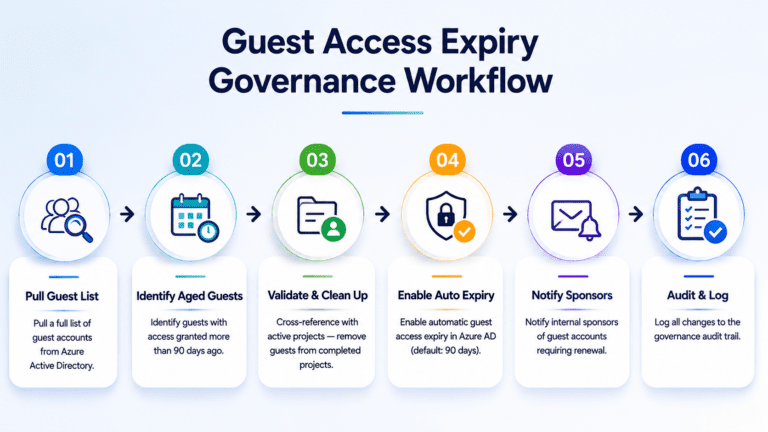
- Guest access granted during a project and never cleaned up
- Security groups that grew over time without any audit process
These issues existed before Microsoft 365 Copilot. They just did not matter as much. Now they matter a great deal.
What Microsoft 365 Copilot actually sees — and does not see
There is a common misunderstanding about how Microsoft 365 Copilot handles data access.
Some people assume Copilot has special elevated access. It does not. Copilot only surfaces data that the current user already has permission to see.
The dangerous part is the word “already.”
- If a user can read a file — even if they got access years ago through a broken group policy — Copilot will return it
- If a folder is shared with “Authenticated Users” — a default setting that often gets overlooked — Copilot treats that as fair game
- If a link was created without an expiry date, that link still works, and Copilot can find the content at the end of it
Microsoft 365 Copilot does not audit your permissions. It trusts them. That is why fixing permissions is not optional before deployment — it is the deployment.
Signs your organization is not ready for Microsoft 365 Copilot
Not every organization that rushes into AI adoption is reckless. Most are just in a hurry. But rushing leads to exposure.
Here are the warning signs that your Microsoft 365 environment is not governance-ready:
- You have not run a permissions audit in the last 90 days
- You use broad security groups without regular membership reviews
- Site owners in SharePoint were set and never revisited
- Guest users exist in your tenant with no expiry policy
- You do not have a data classification policy in place
- Your Microsoft 365 subscription does not include the Microsoft Purview compliance tools
If three or more of these apply to your organization, Microsoft 365 Copilot is a risk before it is a benefit.
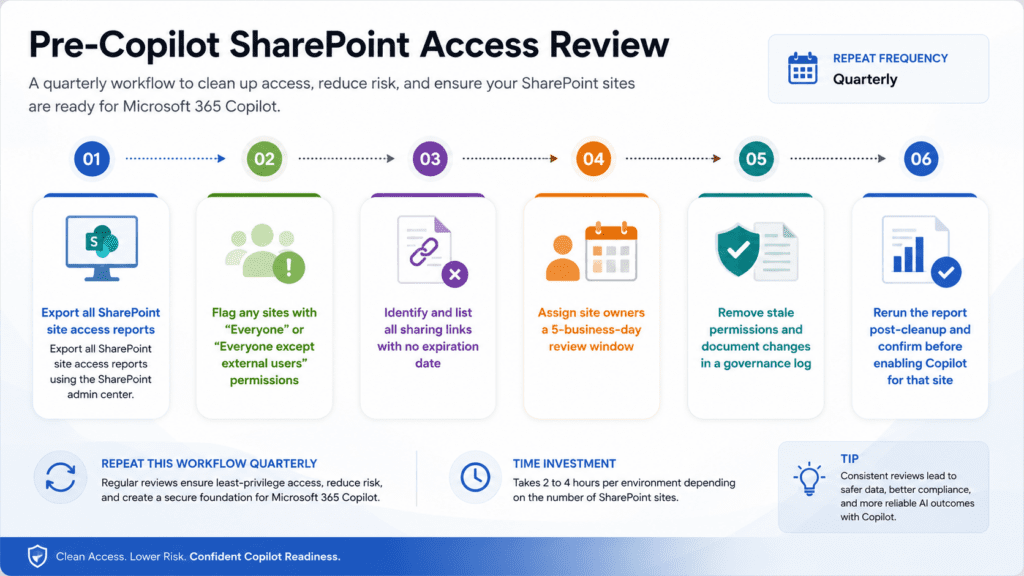
1: SharePoint permissions audit
2: Guest access expiry governance
Suggested Reading:
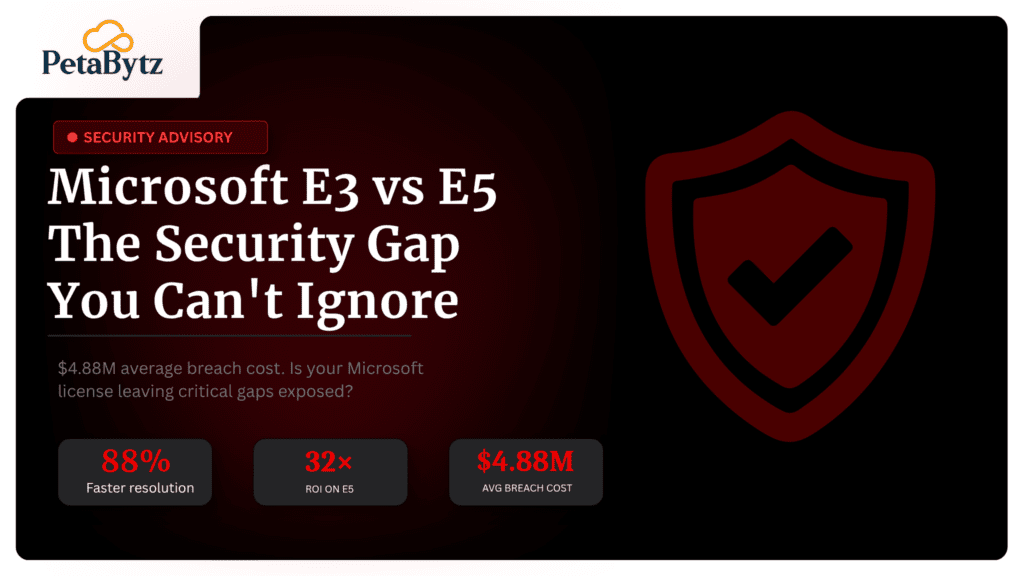
Microsoft E3 vs E5: Is the security upgrade worth the cost in 2025?Best practices to improve your Microsoft 365 Copilot governance posture
Governance does not have to be complicated. These six practices reduce your risk significantly without requiring a full compliance program.
1. Run a permissions audit before turning on Microsoft 365 Copilot
This is the most important step. Use the SharePoint admin center or a third-party tool to export access reports.
Focus on sites with the broadest access first. Fix those before expanding Copilot access to more users.
2. Classify your data using Microsoft Purview
Microsoft Purview is included in microsoft 365 business premium. Use it to label sensitive documents — financial, legal, HR, and executive communications.
Labeled content can be restricted from appearing in Copilot results using sensitivity labels and DLP policies.
3. Enforce least-privilege access across SharePoint
Review every SharePoint site and apply the principle of least privilege. Users should only see what they need for their current role.
Remove inherited permissions that do not match current team structures. Rebuild site access from scratch where needed.
4. Set expiry dates on all sharing links
Sharing links without expiry dates are governance time bombs. Set a default expiry in your SharePoint admin settings — 30 days is a reasonable starting point.
Audit existing links and revoke anything that has been active longer than 60 days without a clear owner.
5. Enable Copilot for groups, not everyone at once
Do not roll out Microsoft 365 Copilot to your entire tenant at once. Start with a pilot group.
Choose a team with clean permissions and a well-structured SharePoint environment. Learn from the pilot before expanding.
6. Establish a recurring governance review cycle
Governance is not a one-time project. Set a quarterly review schedule and assign owners to it.
The cost of a quarterly review is a few hours. The cost of a data exposure incident is measured in regulatory fines, legal fees, and lost customer trust.
The real numbers behind Microsoft 365 governance failures
These statistics show why governance is not a nice-to-have when deploying Microsoft 365 Copilot:
- 82% of data breaches involve human error or misconfiguration, according to the 2023 Verizon Data Breach Investigations Report
- Insider threat incidents have risen 44% over the past two years, per the Ponemon Institute
- The average cost of an insider-related data incident is $15.4 million per year for large enterprises
- Microsoft reports that 80% of SharePoint permissions issues in enterprise tenants are caused by inherited access that was never reviewed
- Organizations that deploy AI tools without a governance framework are 3x more likely to report a data exposure incident within 12 months
Microsoft 365 Copilot is genuinely transformative. But 87% of IT leaders surveyed by Gartner in 2024 said AI adoption without governance was their top security concern.
The technology is ready. The question is whether your permissions model is.
How ITSM Service helps you deploy Microsoft 365 Copilot the right way
Most organizations know they have governance gaps. The challenge is fixing them fast enough to keep up with AI adoption timelines.
That is where the gap between intention and execution creates real risk.
ITSM Service works with organizations at every stage of their Microsoft 365 Copilot rollout. The approach is practical, not theoretical:
- Permissions auditing and SharePoint cleanup before Copilot is enabled
- Microsoft Purview sensitivity label deployment for data classification
- Guest access governance policies and automated lifecycle management
- Copilot pilot program design — who gets access first and why
- Ongoing governance review frameworks your team can actually maintain
If you are running microsoft 365 business premium or working with a microsoft 365 subscription that includes Copilot, ITSM Service can help you use it safely.
The goal is not to slow down your AI adoption. It is to make sure the foundation is solid before you build on it.
Conclusion
Microsoft 365 Copilot is one of the most powerful tools available to businesses today. It can summarize, draft, analyze, and connect information faster than any human team.
But it is only as trustworthy as your permissions model. And most permissions models have been quietly broken for years.
You do not need to overcomplicate this. Start with a permissions audit. Fix your broadest exposures first. Apply sensitivity labels to your most critical data. Then expand Copilot access to teams with clean environments.
Governance is not the enemy of AI adoption. It is the foundation that makes AI adoption sustainable.
The organizations that get this right will use Microsoft 365 Copilot to unlock real competitive advantage. The ones that skip governance will use it to accidentally expose their most sensitive data.
The choice is yours — and it starts with fixing your permissions before you turn Copilot on.
Ready to deploy Microsoft 365 Copilot safely? Talk to Petabytz today and get your governance foundation in place.
Website: www.Petabytz.com
Email: info@petabytz.com
Ready to move faster than your competitors? Talk to Petabytz today
Contact UsFrequently Asked Questions (FAQ’s)
1. Does Microsoft 365 Copilot have access to all my SharePoint files?
Microsoft 365 Copilot only surfaces files the current user already has permission to access. It does not bypass permissions — but it does surface every file the user can legally see, which is often far more than intended. Poor SharePoint governance means Copilot exposes data users should not have access to in the first place.
2. What is the m365 basic plan and does it include Copilot?
The m365 basic plan is Microsoft's entry-level Microsoft 365 subscription. It includes core apps like Outlook and OneDrive but does not include Microsoft 365 Copilot. Copilot requires a separate add-on license and is best combined with microsoft 365 business premium for access to the full compliance and governance toolset.
3. How does microsoft 365 pricing affect which governance tools I can use?
Microsoft 365 pricing tiers determine which compliance and governance features are available. Microsoft Purview — the tool used to label sensitive data and restrict Copilot access — is included in microsoft 365 business premium and Enterprise E3/E5 plans. Organizations on lower tiers may need to upgrade to access the full governance toolkit before enabling Copilot.
Q4: Which ente4. How long does it take to fix SharePoint permissions before enabling Microsoft 365 Copilot?rprise workflows benefit most from AI automation?
For a mid-sized organization with 500 to 2,000 users, a focused permissions cleanup typically takes 2 to 6 weeks. This includes auditing site access, removing stale permissions, classifying sensitive data, and validating the cleanup with a pilot group. Rushing this phase increases data exposure risk significantly.
Recent Posts